Meeting rooms are often overlooked until you find yourself working in a bad one. A table too wide to hear across. A screen placed in a way where participants spend the hour twisting sideways. Layout, in these moments, stops being background detail and becomes the meeting itself.
At its simplest, a meeting room layout is how furniture, technology and people are arranged. In reality, it shapes how work unfolds once the door closes.
The way meeting and conference rooms are set up quietly dictates behaviour, influencing how productive everything from group discussions, workshops and team building activities go.
Hybrid working has raised the stakes, as room layout also determines whether remote participants feel included or sidelined in the conversation.
When the layout fits, the meeting feels easier than it should, reminding us that layout choices go beyond aesthetics or headcount.
Why Meeting Room Layouts Matter
Productivity in meetings is shaped by what people can see, hear, and comfortably do in the room. And different meeting types require the right layout to optimise efficiency.
A layout that forces participants to lean forward to catch voices or squint at a screen quietly drains energy. One that feels balanced and considered keeps attention where it belongs as people stay present for longer when the room isn’t working against them.
Communication follows the lines the space draws. When everyone can make eye contact easily, conversation moves faster and misunderstandings surface sooner. When a table or screen creates physical distance, discussion tends to funnel through one or two voices. Collaboration thrives in rooms that allow people to turn, gesture, and respond without friction. Even subtle barriers can slow that rhythm.
Poor layout choices have a way of hijacking meetings. Time is lost adjusting chairs, shifting screens, or compensating for awkward acoustics. Focus slips. Momentum fades. Comfort plays its part too. Supportive seating, sensible lighting, and enough space to breathe help people stay sharp, especially in longer sessions.
The most effective layouts start with intent. When the room is designed around what the meeting needs to achieve, participation feels natural and the work moves forward with less effort.
Common Types of Meeting Room Layouts
Meeting room layouts tend to fall into familiar patterns, but the way they’re used and adapted varies widely across UK workplaces. Some setups lean on tradition and hierarchy. Others are designed to flex as the work shifts. Each carries its own signals about how the meeting should run and who holds the floor.
Boardroom Style Layout
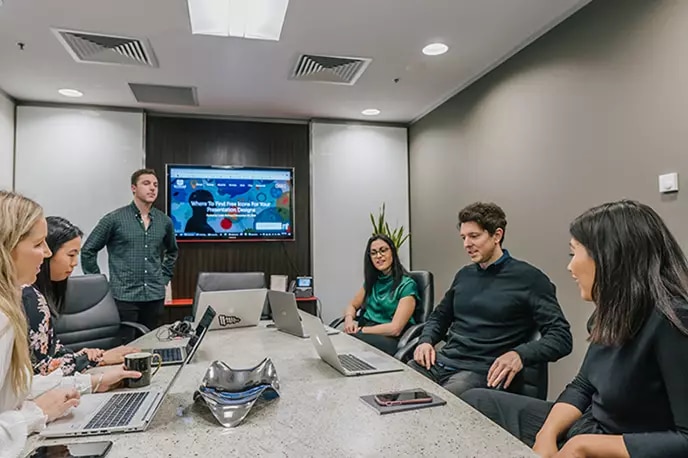
The classic boardroom layout is built around a single table, with participants facing one another across it. It suits formal meetings, decision-making, and meetings where clarity and structure matter. Authority is usually anchored at one end of the table, whether intentionally or not. That can help keep conversations orderly, but it can also narrow participation if the room feels too rigid.
U-Shape Layout
The U-shape layout opens the room while keeping a clear focal point. Participants face inward, making eye contact easier and discussion more fluid than in row-based setups. It works well for workshops, facilitated discussions, and hybrid meetings where a presenter needs space to move while staying connected to the group.
Theatre Style Layout
Picture rows of forward-facing chairs remove the distraction of tables and side conversations. This layout works best for briefings, presentations, or town-hall style sessions where information flows in one direction. Engagement depends heavily on the speaker, because interaction is limited by design.
Classroom Style Layout
Classroom layouts take inspiration from the scchoolground. Tables arranged in rows with forward-facing seating with a clear view of the speaker or screen, offering space for note-taking and devices. Training sessions and workshops often rely on this format. It balances focus with practicality, though discussion tends to happen in pockets rather than across the room.
Round Table and Cabaret Style Layouts
Smaller tables with shared seating encourage conversation without flattening the room entirely. These layouts support group work, problem-solving, and collaborative sessions where participation matters more than formality. While great for direct communication, it can be difficult for attendees to see any visual aids, especially screens.
Modular and Hybrid Layouts
Movable furniture allows rooms to change shape as the session unfolds, making them the perfect meeting room layout for shared workspaces. These layouts suit modern, hybrid meetings where authority shifts, discussion evolves, and participation needs to stay fluid rather than fixed.
Hollow Square Meeting Room Layout
Tables arranged in a square with an open centre create a sense of balance. Everyone sits on equal footing, with no obvious “head” of the table, which supports open dialogue and collaborative thinking. This layout works well for brainstorming and discussion-heavy meetings, though it offers little support for presentations or larger groups that need a clear focal point.
Banquet Style Meeting Room Layout
Round tables with seating all around are designed for meals, networking, and social functions. They encourage informal interaction and movement between conversations. For presentations, however, sightlines can suffer, and attention tends to fragment across the room.
The Role of Meeting Room Policies and Planning
Even the best-designed meeting room struggles without clear guidance. Simple, consistent policies around booking, setup, and use remove small points of friction that can derail a meeting before it starts. When people know what a room is for and how it’s meant to work, they arrive ready to focus rather than negotiate logistics.
Poor policies create a different experience. Double bookings, rooms left in the wrong layout, meetings that overrun because no one feels able to reclaim the space. The disruption is subtle but persistent, and productivity quietly slips away.
Planning also affects how long meetings last. A discussion-friendly layout invites conversation, while presentation setups naturally keep things tighter. Encouraging employees to choose layouts that match their intent — rather than defaulting to what’s free — leads to smoother sessions and clearer outcomes.
Strong policies don’t restrict behaviour. They support it, helping spaces work as intended and meetings finish with less effort.
Alternative and Emerging Meeting Room Layouts
As meetings become more layered - part in-room, part on screen, part discussion, part decision - layouts are starting to loosen their edge.
Hybrid curve layouts are a good example of this shift. Seating follows a soft arc rather than a straight line, which puts faces where cameras expect them to be. Remote participants stop feeling like a window on the wall and start feeling like they’re actually in the room.
Fishbowl and V-shape layouts tend to appear when the conversation itself is complicated. A smaller group takes the centre or the open end, while others listen, step in, step back, and rotate as needed. It’s a way of managing strong opinions without flattening the discussion, and it keeps momentum when topics are sensitive or contested.
Moveable furniture underpins most of these newer formats. Tables with wheels, lightweight chairs, writable surfaces that travel and modular walls. Spaces can split into pairs, reform into trios, then pull back together without stopping the meeting cold. This supports what many teams now rely on: short bursts of focused work in small groups before returning to the whole. The room shifts with the thinking, not the other way around.
How to Set Up a Meeting Room Layout Effectively
- Start with the purpose of what you’d like to achieve in the meeting. A decision-making session needs a different shape to interactive workshops, and the room should reflect that from the outset.
- Position screens, cameras, and microphones where they support the conversation, not compete with it. Remote participants should feel present, not peripheral.
- Leave clear walkways and enough space to move comfortably, with accessibility considered as standard rather than an afterthought.
- Avoid filling the room to its limits. A slightly under-occupied space keeps people focused and at ease.
- Before the meeting starts, check sightlines, sound, and lighting. Small adjustments here prevent bigger distractions later.
Common Meeting Room Layout Mistakes to Avoid
- Packing too many people into a room or leaving it half empty, both of which throw off energy and attention.
- Treating comfort, lighting, and accessibility as secondary concerns, then wondering why focus drifts.
- Defaulting to familiar layouts that don’t suit what the meeting is meant to achieve.
- Forgetting to plan for screens, cameras, and audio, leaving hybrid participants on the margins.
- Allowing unclear booking and setup practices to create friction, wasted time, and avoidable disruption.
Meeting Room Layouts in Hybrid Workplaces (2026 and Beyond)
Hybrid meetings quickly expose weak layouts. When some people are in the room and others on screen, any imbalance becomes obvious. Those present can read the room and jump in. Remote participants rely entirely on what the setup lets them see and hear.
That’s why technology now sits at the centre of layout planning. Cameras need to meet eyelines, not skim the tops of heads. Microphones must follow conversation as it moves. Screens work best when they’re treated like participants, placed where attention naturally lands.
Acoustics and visibility are getting sharper focus too. Softer finishes, better spacing, and staggered classroom rows reduce echo and blocked sightlines. Hybrid curve layouts help align faces with cameras, making remote voices feel closer to the room.
More teams are also designing spaces around core behaviour. A discussion room should invite exchange. A training room should hold focus. Reconfigurable furniture allows layouts to shift quickly, supporting varied formats without slowing the work down.
Key Factors to Consider When Choosing a Meeting Room Layout
- Start with what the meeting needs to achieve and how much interaction it requires. Discussion, training, and decision-making all ask different things of a room.
- Consider how many people will attend and how they’re likely to move, speak, or break into smaller groups.
- Work with the room itself — its size, floor space, shape, and access to natural light — rather than forcing a layout that doesn’t quite fit.
- Plan technology early. Screens, cameras, microphones, and power should support the meeting without dominating it.
- Build in accessibility and comfort as standard, not as optional extras.
- Avoid filling the room to its limits or leaving it oddly empty; both affect focus.
- Check that the final layout allows technology to work properly, with clear sightlines, usable audio, and minimal distractions.
Frequently Asked Questions